AI Agent Development for Business
AI agent development means building an AI that does more than answer: it carries out tasks through your systems, such as drafting invoices, updating customer records, sending reminders or summarising reports. Metanotech starts with one workflow, with clear permissions, human approval for sensitive steps and a record of every action.
Quick facts
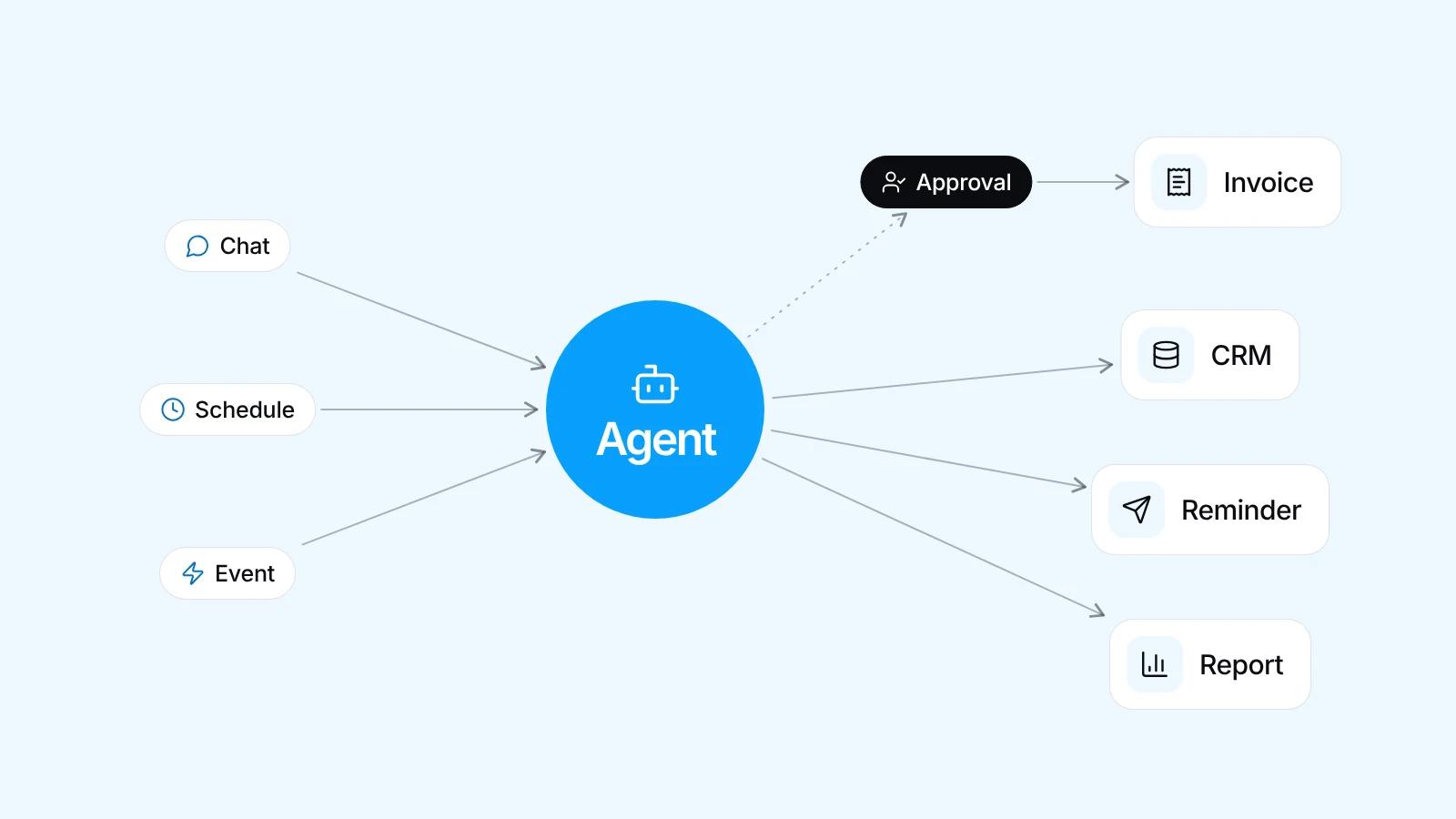
- A chatbot answers questions, an AI agent carries out tasks through tools you allow
- Triggers: a WhatsApp message, a schedule, or a system event such as a new order
- Sensitive steps, like invoicing a customer, wait for a person's approval
- An audit log records who asked, what was read and what changed
- Fixed-rule processes suit plain automation better: it is cheaper and predictable
How an AI agent differs from a chatbot
A chatbot answers, an AI agent acts. It uses tools, functions deliberately opened to it, such as checking stock, drafting an invoice, changing a lead's status or sending a reminder. The model picks the tool and its inputs, and your system runs and checks the call. This is often called agentic AI.
Take this request: list the unpaid invoices, then remind customers who are past their due date. The agent reads the invoice data, filters the late ones and drafts a message for each customer. Nothing goes out until you approve it, because AI can still misread data or misunderstand a request.
Work that suits an AI agent
AI agents are most useful when requests come in free-form language, need data from several places, and follow steps that can be spelled out. Our AI portfolio has work close to this: WhatsApp assistants handling invoices, billing and business reports, an assistant for managing data, and one for team work.
- Drafting an invoice from a confirmed order for finance to approve
- Updating customer records or lead status from short staff messages on WhatsApp
- Compiling routine sales reports and sending a summary to the management group
- Assigning tasks to team members and reminding them of approaching deadlines
What triggers an AI agent
Every agent needs a clear trigger, and there are three kinds. A message: a staff member or customer sends a request on WhatsApp or through a chat box in your app. A schedule: for example, listing the invoices falling due each morning. A system event: a new order or incoming payment makes the system send a webhook, an automatic notice to the agent. With a schedule or event nobody is waiting, so the output goes to the person responsible first.
Designing permissions: acting alone or waiting for approval
What matters most in an AI agent is not the prompt, the written instructions for the model, but its permissions. AI can misunderstand a request, so each tool is sorted by one question: if the agent gets this step wrong, how hard is it to fix, and who is affected? Approval stays light: approve, edit or reject, on WhatsApp or in the app.
- Alone: reading data, checking stock, preparing drafts and summarising internal reports
- With approval: sending invoices or messages to customers, changing key records and creating orders
- Never opened: deleting data, making payments and changing user access rights
- The agent has its own narrow-access account and can never exceed the rights of the person asking
- Sensitive data like bank account numbers stays out of the model unless needed
Audit logs and handling failure
Every action goes into an audit log the agent itself cannot edit: who triggered it, what data it read, which tool it called with which inputs, the result, and who approved it. That log is where mistakes are traced and where the agent's instructions get improved from real cases.
Failure is designed in from the start. If the target system is down, the agent retries within a limit, then alerts a person. If a request is ambiguous, it asks rather than guesses. If data is missing, it stops and says so. A check also stops the same reminder going out again.
When you do not need an AI agent
Not every automation needs AI. If a process fits a fixed rule, for example every overdue invoice gets the same template reminder, rule-based automation is cheaper to run, behaves the same every time and is easier to audit. A sound design is often a mix: rules for the fixed parts, AI for the messy ones. If rules alone will do, or your data is not in any system yet, we will say so, because an agent is only as good as its data and access.
How we build an AI agent with you
It starts with a free consultation on WhatsApp, with no commitment. We map the flow that makes sense for your goal, then choose the model with you, such as Claude, Gemini or an OpenAI model, weighing the task, usage cost and your data rules. Design and development run side by side, so you see progress directly.
- Choose one workflow, its trigger, and what a good result looks like
- List the tools the agent needs and the permission level for each
- Test on real cases from your records, then pilot with a small group of users
- Check the logs, measure results, and add the next workflow once the first is in daily use
| Aspect | Chatbot | AI agent | Rule automation |
|---|---|---|---|
| What it does | Answers questions from available data | Carries out steps through permitted tools | Runs fixed steps when a condition is met |
| Example | Answering an order status question | Drafting an invoice, then asking for approval | Sending a reminder when an invoice is overdue |
| Behaviour | Answers vary, so they stay tied to your data | Steps vary, so permissions and an audit log are needed | Same input, same result, every time |
| Fits when | Questions vary and no data needs changing | Multi-step tasks with untidy input | The process is fixed and the rules are clear |
Frequently asked questions
How is an AI agent different from an AI chatbot?
An AI chatbot answers questions, while an AI agent also carries out tasks through permitted tools, such as drafting an invoice, updating a customer record or sending a reminder. Because an agent can change data, it needs permission limits, approval for sensitive actions and an audit log.
Can an AI agent work without supervision?
Yes, but only for low-risk steps that are easy to undo, such as reading data, checking stock or drafting an internal report. Anything touching customers, payments or key records waits for approval, because AI can misunderstand a request. Limits can be loosened as the logs show it handling real cases correctly.
What happens when an AI agent makes a mistake?
The mistake is traced through the audit log, which shows who triggered the agent, what data it read, which tool it called and the result. That reveals whether the fault is in the data, the instructions or the permissions, so that part gets fixed. For actions needing approval, a person can still catch it at the draft stage.
When is plain automation a better fit than an AI agent?
When the process fits a fixed rule and the data is tidy, for example sending a template reminder whenever an invoice passes its due date. Rule-based automation is cheaper, behaves the same every time and is easy to check. An AI agent makes sense when input is free-form or the steps depend on the request.
How much does AI agent development cost?
Pricing depends on what you need and the scope of the work. Tell us about it on WhatsApp, the consultation is free, and we will send you a proposal that fits.
What should we prepare before building an AI agent?
Prepare one workflow you want automated, real examples from your records including the hard ones, access to the systems the agent will use, and one person in charge who sets the ground rules, approves the permission levels and reviews the pilot. Procedure documents help, but real examples help more.
Related services
Start a project
Tell us the problem.We'll build the fix.
Free consultation on WhatsApp. Tell us about your business, what you want to build, and what is getting in the way.