Company AI Knowledge Base for SOPs and Internal Documents
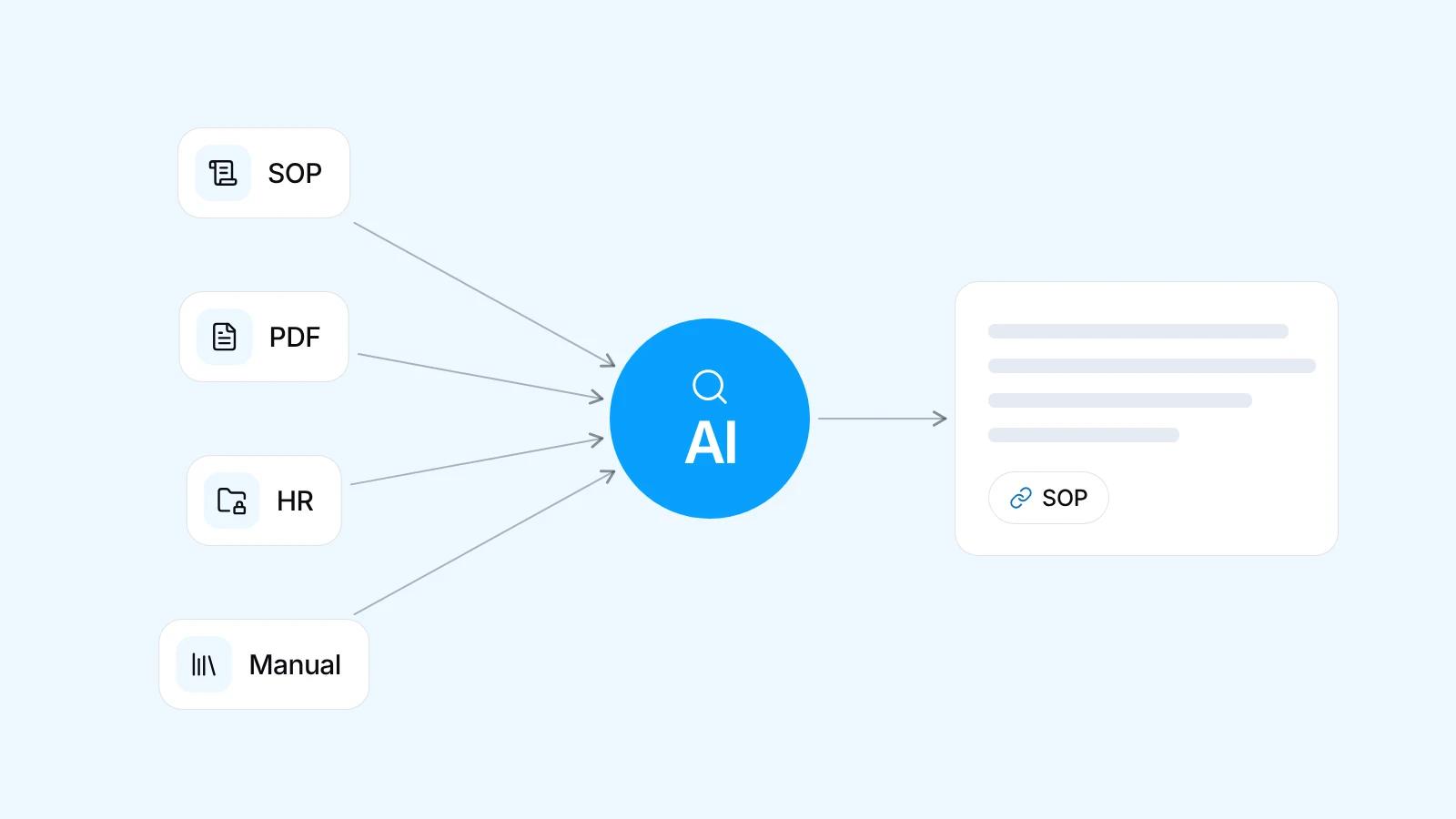
A company AI knowledge base is an internal assistant that answers employees' questions from your company documents, such as SOPs, product manuals, HR policies and project files, and names the source of every answer. This method is called RAG: the AI looks things up in your documents rather than relying on the model's memory. Access follows roles, so only HR can query HR documents.
Quick facts
- Answers are built from your documents, not from the AI model's general knowledge
- Every answer shows its source: document name, version and the section quoted
- Access follows roles, so only the HR team can query HR documents
- Questions it cannot answer are logged to close gaps in the documents
- Start with one document set, such as warehouse SOPs, and expand once answers are checked
How a company AI knowledge base works with RAG
Your documents are split into short passages, and each one is turned into an embedding, a list of numbers representing the text's meaning. Searching by meaning this way is called vector search. An employee asking how to return a damaged item still finds the SOP titled product return procedure, even though the wording differs.
The most relevant passages go to the AI model with the question, plus instructions to answer only from them and to say when the answer is not there. The model needs no retraining: once a document changes, the answers change with it. So document quality shapes results more than the choice of model.
Why copying documents into a public chatbot falls short
Many teams start by copying an SOP into a public AI chatbot. For one document and one question, it works. Once it becomes an office-wide habit, four problems appear, and they are the reason companies build their own internal document chatbot for staff.
- No access by role: anyone holding a file can paste it in
- Old versions stay in use because there is no single official source
- Answers without sources are hard to verify
- Content falls under the provider's terms, which may not match your data rules
Preparing documents before they go in
The assistant is only as good as the documents it reads, so preparing them is the biggest early job. With each document's owner we remove duplicates, mark the version in force, archive old versions and record who keeps it updated. Text-based PDFs, Word files and Google Docs read well. Scanned PDFs need OCR, the step that turns images of text into real text.
Answers that show their source
This is what separates AI for company SOPs from a general chatbot: every answer lists the document name, version and the section quoted, so employees can open the source themselves. Staff get used to checking, and disagreements are settled by pointing at the SOP. When there is no answer, the assistant names the document owner to ask. When two documents conflict, it shows both instead of quietly picking one.
Access by role and data rules
Access is set per role: HR policies and payroll procedures for HR only, finance SOPs for finance, project files for the project team. Documents are filtered by the asker's access before the search runs, so an answer cannot draw on a document that person may not open, however cleverly the question is phrased.
Data rules are settled before any document goes in. Highly sensitive data, such as individual salaries or identity numbers, can be left out of the search index entirely, so it is never sent to the model. The AI model is chosen with you per use case, based on the task, usage cost and your company's data rules.
Keeping it current and closing the gaps
A knowledge base goes stale when an SOP changes but the old file stays in. So updating becomes part of the document owner's routine: the new version goes into the shared folder, the system reads it again, and the old version is archived so it no longer feeds answers.
Questions the assistant could not answer, or whose answer was marked unhelpful, go into a list reviewed by the document owners. That list often reveals knowledge nobody wrote down, such as a procedure that lives only in a senior employee's head. Writing it down helps the company even beyond AI.
Limits you should know about
A company AI knowledge base can still be wrong. OCR can misread a blurry scan, tables can lose their structure, and two active versions of one document can produce conflicting answers. Live data such as stock belongs to ERP integration instead. For decisions with consequences, such as disciplinary action or contract terms, a person still reads the original source.
Steps to build an internal AI assistant
We start with a free, no-commitment WhatsApp consultation, then map the flow that makes sense for your goal. The system grows in stages: one document set goes into daily work before the next stage begins. Our AI portfolio includes an assistant for managing data and an assistant for team work.
- Pick one user group and one document set, such as the warehouse team and its SOPs
- Collect the questions they ask most often
- Tidy the documents, set access rights, then build the assistant
- Test with real questions and check each answer against its source
- Expand to other departments once the first group actually uses it
| Document type | Examples | What to prepare |
|---|---|---|
| SOPs and work instructions | Warehouse SOPs, return procedures, machine instructions | Current version, a named owner, steps in order |
| Product manuals and specifications | Technical manuals, spec sheets, installation guides | Text-based PDFs, OCR for scans, tables checked by hand |
| HR policies | Company regulations, leave, business travel | HR-only access, employee personal data removed |
| Project files | Meeting minutes, progress reports, handover records | One folder per project, access per project team |
| Answers repeated in team chats | Explanations often resent in WhatsApp groups | Written up as an official document its owner approves |
Frequently asked questions
What is RAG in a company AI knowledge base?
RAG, short for retrieval augmented generation, means the AI first finds relevant passages in your documents, then answers only from them. The model needs no retraining on company data, because updating the documents is enough. Every answer can also show its source for employees to check.
Are our company documents used to train the AI model?
With RAG, your documents are not used to retrain the model. They are processed into a search index, and passages go to the model only to write answers. Whether a provider keeps that data, and for what, depends on its data terms, so providers are chosen with you and the most sensitive data can be left out entirely.
What happens when a company SOP changes?
The document owner uploads the new version to the shared folder linked to the assistant. The system reads it again, archives the old version, and answers come from the new one after the next sync. An SOP change needs no new project, just the discipline to store the latest version in the right place.
Can employees reach documents they are not allowed to see?
No, as long as access rights are set up correctly. Before searching, the system opens only the documents the asker's role allows, so answers cannot come from anything else. Access follows your organisation chart, such as HR documents for HR only, and the log of who asked what is readable only by designated admins.
How much does a company AI knowledge base cost?
Pricing depends on what you need and the scope of the work. Tell us about it on WhatsApp, the consultation is free, and we will send you a proposal that fits.
Can staff use the internal AI assistant on WhatsApp?
Yes. The assistant can sit on a web page inside your company system, or on WhatsApp for field staff who rarely open a laptop. Each WhatsApp number must be linked to an employee identity so access rules still apply. Unregistered numbers get no answers from internal documents.
Related services
Start a project
Tell us the problem.We'll build the fix.
Free consultation on WhatsApp. Tell us about your business, what you want to build, and what is getting in the way.